
Lotus365 ID Registration
A Lotus365 ID (Lotus365 Register) generally refers to a user account that provides access to the platform’s dashboard, wallet, sports markets, and casino-style sections. In practical terms, the ID is the user’s main login identity and is often tied to a mobile number, password, and verification step.
When people search lotus365 register or lotus365 id, they are usually looking for one of three things. Some want to know how to create an account. Others want to confirm whether a link, number, or agent is genuine. A third group is looking for a demo or trial-style access method before using real money.
Because the brand is often shared through multiple links, mirror domains, messaging apps, and informal referrals, confusion around the word “ID” is common. For many users, the real question is not just “How do I make an ID?” but “How do I make sure I am using the right site and not a fake one.”
Table of Contents
Common Registration Paths Users Encounter
Users usually come across two main account-creation paths. One is a direct web registration route. The other is a support- or agent-assisted route, often through messaging apps.
Direct Lotus365 Website Registration
In a direct registration flow, the user typically
- Goes to a site and clicks ‘register’.
- Enters a phone number,
- Makes login information, and
- Finishes checking the OTP.
This is the standard digital path and usually involves the least human interaction.
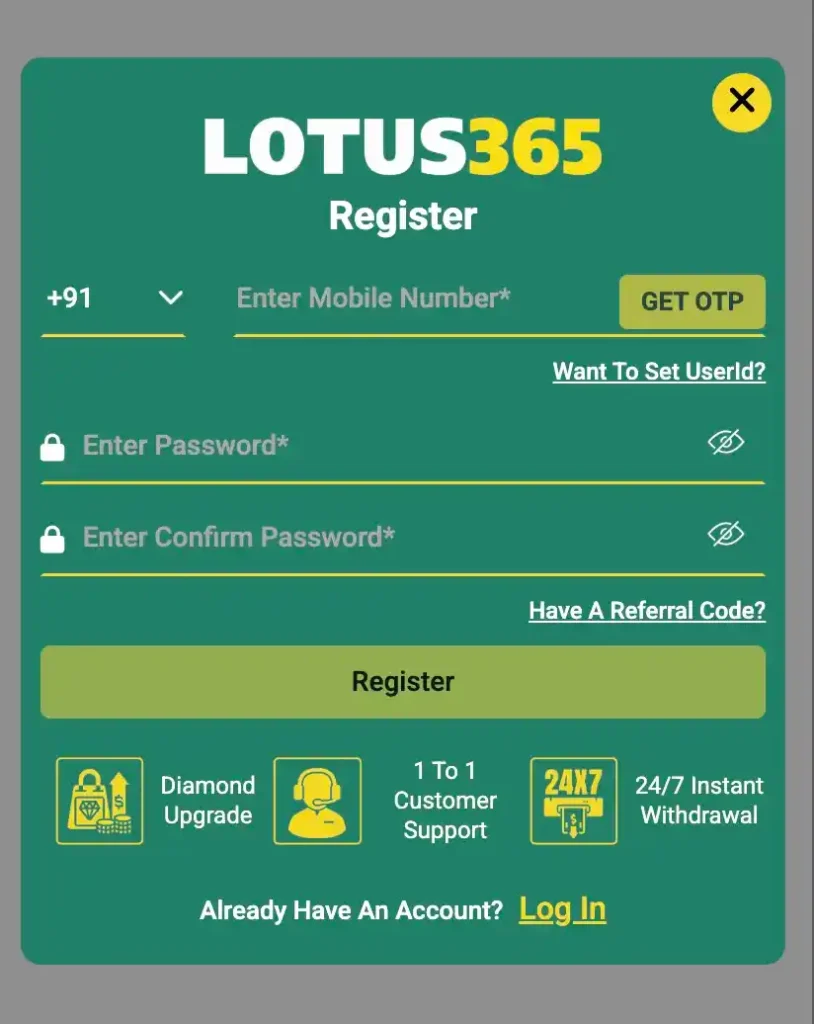
One benefit of direct registration is that the user doesn’t have to share information with other people; they can stay on the platform. The biggest risk is that users won’t know if the domain they opened is the real one or a mirror, clone, or phishing page.
Lotus365 WhatsApp or Agent-Assisted Registration
Many people also look for the lotus365 customer service number, whatsapp number, or agent because sometimes they have to register by sending a direct message. In that model, an agent or support person might send a link, ask for basic information, explain the process, or help the person through the steps of depositing and verifying.
This route may feel easier for first-time users, but it carries much higher scam risk. A fake agent can imitate support language, ask for money, share a fake link, or collect personal details. That is why users should treat any third-party registration help with caution.
Typical Registration Flow Users Report
Although platforms may vary, the account-opening process usually includes the same core steps.

- First, the user reaches a registration page.
- Second, they provide a mobile number or similar identifier.
- Third, they set a password or login credential.
- Fourth, they confirm the account through OTP or another verification method.
- Fifth, they enter the dashboard and may be asked to verify identity later before withdrawal or larger account activity.
Some platforms keep the first step extremely simple to reduce drop-off. They ask only for a phone number and password. Others request a username as well. In either case, users should avoid reusing passwords and should verify the domain before entering any login details.
Lotus365 Register Process
Step 1: Visit the Lotus365 Official Website
Go to lotus365.com or lotus365.com.in (bookmark now!)
Use Chrome/Safari on mobile or desktop
Clear cache if site doesn’t load (rare issue)
NO VPN needed – works on Jio/Airtel 4G
Pro Tip: Always use official domains. Avoid Telegram links or “agent” sites.
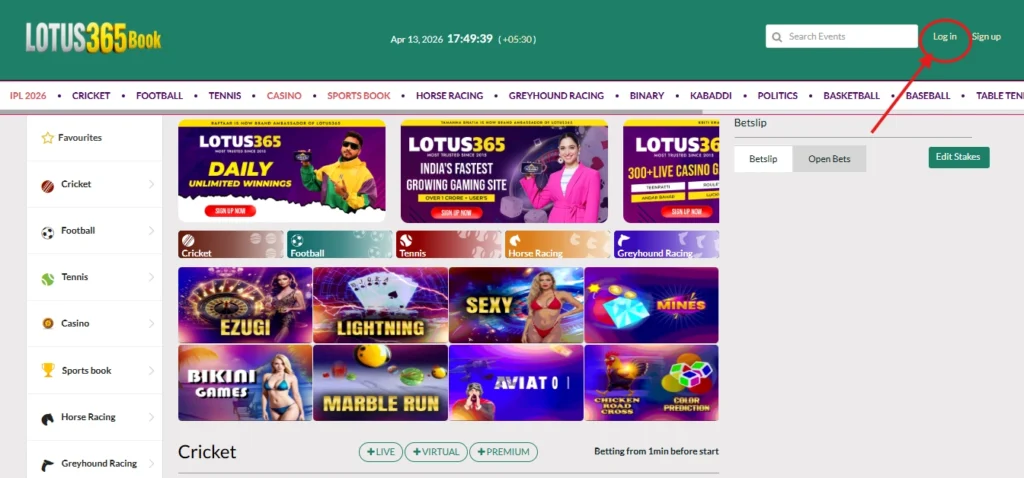
Step 2: Find “Sign Up” Button (Top Right Corner)
Mobile: Scroll slightly or tap menu (3 lines) → “Register”
Desktop: Top-right corner – bright “Sign Up” / “Register” button
Can’t find? Check footer or homepage banner
Step 3: Click on “Sign up.” (Registration Form) Opens
Clicking Sign Up triggers a popup/modal form with 4 simple fields. Fill completely:
Registration Form Fields (Complete All)
1. Create Username
- 6-15 characters (letters/numbers only)
- Unique across platform (shows availability instantly)
- Examples: “CricketKing24”, “IPLBetMaster”, “RohitFan365”
- Avoid: Special characters, spaces, full names
2. Enter Password + Confirm Password
- Minimum 8 characters
- Must include: 1 uppercase, 1 number, 1 symbol
- Examples: “Kohli@2026”, “IPLWin$365”, “CSKKing9”
- Both fields must match exactly
Password Strength Meter: Green = Strong (required for submission)
3. Enter Phone Number (+91 India)
- Select +91 country code automatically
- 10-digit mobile (no zeros prefix)
- WhatsApp-enabled numbers work best for OTPs.
- Real number only – used for withdrawals/security
4. Verify OTP (Final Step)
- Click “Send OTP” button
- Receive 6-digit code via SMS (10-30 seconds)
- Enter code in OTP field
- Click “Verify OTP”
OTP Issues?
- Resend available after 30 seconds
- Check signal/data connection
- Enable SMS permission in phone settings
- Code expires in 5 minutes
SUCCESS! Account Created & Auto-Logged In
Immediate Results After OTP Verification:
- Welcome popup with balance ₹0.00
- Auto-login to dashboard
- Cricket ID activated instantly
- Welcome bonus notification (claim after deposit)
Dashboard Shows:
- Username (top-right)
- Wallet Balance
- Cricket tab (IPL odds live)
- Bet history empty
Lotus365 ID Kaise Le – What Users Should Check First
People searching for ‘lotus365 id kaise le’ usually want a quick answer, but the safer answer starts with checks, not form-filling.
- Users should check the following before making any account:
- the address of the website is right,
- the page is safe because it uses HTTPS,
- You can get to the support channel from the site itself,
- The registration page doesn’t ask for strange personal information too soon.
- The platform’s terms also make it clear what the rules are for verification and payment.
Users make the biggest mistake when they rush from a shared message to creating an account without checking to see if the page is real. If someone tells you to “just send money and ID will be activated,” that’s a big red flag.

Lotus365 Free ID – What That Usually Means
People often use the term “Lotus365 free ID” lotus365 register in ways that make things unclear. In many cases, “free ID” doesn’t mean you can use real-money features without any limits. It usually means that you don’t have to pay a separate fee to open the account. You may still need to make a deposit before you can use some parts.
Agents trying to get people to sign up sometimes use the phrase “free ID” to do so. In those cases, they might help you set up the account for free. That doesn’t mean you don’t need to check carefully.
When users hear things like “instant free ID”, “VIP free ID”, or “free ID with full balance”, they should be careful. Those claims are often used in ads that aren’t true.
Lotus365 Demo ID – How Demo Access Is Usually Presented
The phrase ‘lotus365 demo ID’ usually refers to a non-monetary trial or preview account. A demo mode, if available, is generally meant to show the interface, market layout, or sample gameplay without requiring real-money use.
For users, a demo-style environment can be useful because it reduces the pressure to deposit before understanding the platform structure. It can help people see how the dashboard works, how sections are organised, and what the user journey looks like.
However, users should remember that demo environments do not always provide the exact real-money experience. Balance handling, market limits, verification steps, and withdrawal rules may not appear at all in a demo account. That means a demo can help with interface familiarity, but it cannot confirm payout reliability or policy fairness.
Lotus365 ID Banane Ka Tarika
When someone searches ‘lotus365 id banane ka tarika’, they usually want a direct method. The safer version is:
- First, verify the site.
- then read the registration terms,
- create the account only on the official page,
- complete OTP verification yourself,
- and never send credentials or payment screenshots to random third-party contacts.
A user should also understand whether KYC is required and when. Some platforms allow signup first and request identity verification only at the withdrawal stage. That can create trouble later if the user’s name, payment method, and documents do not match.
A careful account setup is better than a fast account setup. Most serious disputes begin with poor onboarding.
Lotus365 Customer Care Number and WhatsApp Number
The Lotus365 customer care number and the Lotus365 WhatsApp number are extremely common because many users prefer speaking to a person instead of using a form. But this is also where many scams start.
- A number on Telegram, WhatsApp, or social media is not automatically genuine.
- A person may claim to be supportive, ask the user to send money, or request OTP codes.
- No legitimate support process should require the user to hand over their OTP, password, or unrelated personal data.
Users should treat all support numbers with caution unless those numbers are clearly listed on the platform’s official site. Even then, they should avoid sending sensitive information through unsecured chat unless absolutely necessary and clearly requested through a verified process.
Lotus365 Agent – Role and User Caution
The term ‘Lotus365 agent’ usually refers to a third-party intermediary who helps users create accounts, fund wallets, or access links. In some systems, agents act like informal local onboarding channels. In others, the word is used loosely by anyone sharing referral links.
From a user-safety perspective, agents are one of the highest-risk areas. An agent may be genuine, but the user usually has no easy way to verify that. A fake agent can collect deposits, share invalid links, or disappear after first contact.
If someone decides to talk to an agent-like contact, they should never:
- share passwords,
- share OTPs,
- send money before verifying the official domain.
- or assume that a WhatsApp display picture proves authenticity.
Account Verification and KYC
After registration, many platforms require KYC before allowing larger withdrawals or certain account actions. This usually involves identity documents, name matching, and payment-method verification.
- Users should make sure that the name on their ID matches the name tied to their payment account.
- Mismatched names are one of the most common reasons withdrawals are delayed or rejected.
- People should also be careful about using someone else’s bank or wallet details, as that often triggers compliance review.
Just because a platform asks for KYC doesn’t mean it’s bad. Just because a platform asks for KYC doesn’t mean it’s bad. KYC is common in many systems. The most important thing is that requests for documents should come through the platform’s real account process, not through random messaging contacts.
Payment and Wallet Awareness
Many users assume registration ends once the account is created, but payment setup is often where the real risk starts. A direct platform wallet, an official deposit page, and a documented transaction history are very different from sending money to a personal number provided by a stranger.
Before adding any funds, users should confirm:
- The deposit method is shown inside the account.
- The amount is clearly recorded.
- The wallet updates properly.
- and support instructions match what the official platform states.
If someone tells a person to “send to this private number and balance will be added later,” they should be very cautious. Informal payment handling is one of the easiest ways for users to lose money without any recovery path.
Mirror Links and Domain Confusion
One reason registration content becomes confusing is that users may see multiple domains or changing links. Mirror links are often used when a main domain is blocked, restricted, or replaced.
For the user, the problem is simple:
- Multiple working links make it harder to know which one is official.
- That is why bookmarking the verified link matters.
- If a person repeatedly receives different domains from different numbers, they should pause and confirm before logging in.
A fake mirror can look almost identical to a real site. Small spelling changes, extra hyphens, or unusual endings are common warning signs.
Mobile Registration and App Access
Many users create accounts from mobile devices. On Android, some platforms use APK files rather than app store listings. On iPhone, some services rely on browser-based “add to home screen” access rather than a standard app.
Users should be extremely careful with APK downloads. Installing an app from an untrusted source can expose the phone to malware, keylogging, or fake wallet prompts. If an APK is offered, it should only be downloaded from a verified official source, and the user should understand the device risks before installing anything.
On iOS, browser-based access may be safer than random profile installs, but users should still verify the site and avoid entering credentials into untrusted popups or copied interfaces.
Common User Problems During Registration
The most common registration problems usually include:
- OTP not coming,
- Entered the wrong number,
- Mistakes with passwords,
- Fake support numbers,
- Money sent to the wrong place,
- And later, a KYC mismatch.
These issues are often preventable. Users should take screenshots of official steps, avoid rushing through OTP prompts, and keep records of any payment or support message. They should also complete identity checks early if the platform requires them, rather than waiting until they need a withdrawal.
Safer Checklist Before Creating Any ID
Before creating any account, a careful user should do the following:
- Verify the site address,
- Make sure the page uses HTTPS.
- Avoid agent-only signups.
- Do not share OTPs.
- Use a unique password.
- Verify whether KYC will be needed.
- Read the withdrawal rules.
- Fnd save the platform’s official support details from the site itself.
These steps are much more important than speed. Most account troubles come from skipping basic verification.
FAQs About Lotus365 ID
What is a Lotus365 ID?
A Lotus365 ID is usually the main account that the user uses to log in, get to their wallet, and move around the platform. It usually has a mobile number or similar login information linked to it. Before entering any information, users should make sure they are making it on the right site.
How do people usually complete Lotus365 registration steps?
Most of the time, users go to a registration page, fill out some basic information, verify their OTP, and then go to the dashboard. Completing the process directly on the official site is the safest way to do it, not through a third-party contact.
What does a Lotus365 free ID usually mean?
It often means that there is no separate signup fee, not that you can use real money without any conditions. After opening an account, users should check to see if deposits, verification, or other requirements still apply.
Is the Lotus365 demo ID the same as a real account?
Not usually. A demo ID is usually a test or preview environment with limited or fake access. It might help users understand the interface, but it doesn’t always show the whole real-money process, especially when it comes to deposits and withdrawals.
Should I trust a Lotus365 customer care number or a Lotus365 WhatsApp number from social media?
Not all the time. You should only trust a support number if it is clearly listed on the platform’s official site that has been verified. People should never give out their OTPs, passwords, or sensitive financial information to people they don’t know.
What is the biggest risk with a Lotus365 agent?
The biggest risk is that the person isn’t real or is trying to trick you. An agent can send a fake link, ask for money directly, or use personal information in the wrong way. Users should check all links and not let strangers control the registration process.